
Mobile App Sandboxing: The Invisible Architecture Protecting Your Data
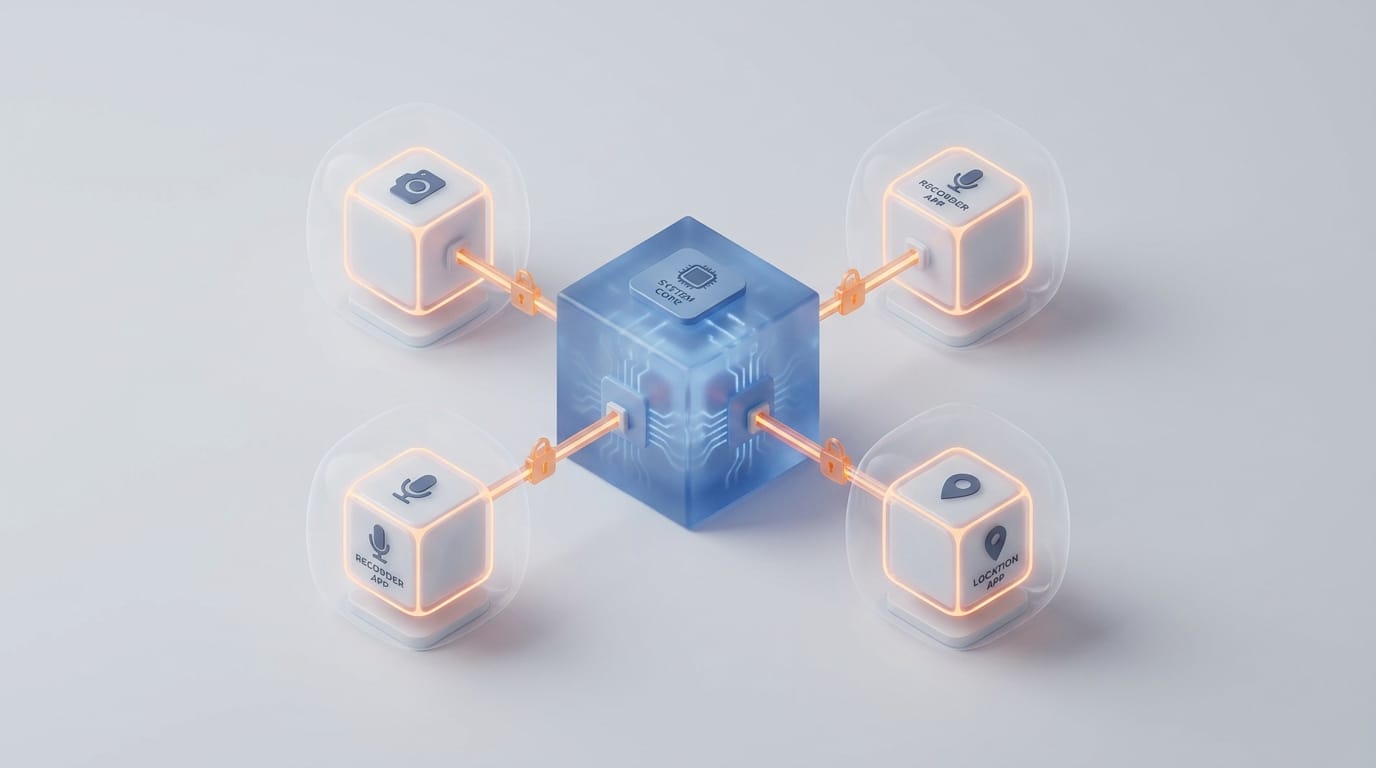
When you grant a mobile app access to your camera, you aren’t opening your entire file system; you are carefully unlocking a single door in a reinforced digital room. This containment strategy, known as mobile app sandboxing, serves as the fundamental layer that prevents a weather app from reading your bank credentials or a malicious game from hijacking your microphone. By isolating every application within its own restricted environment, the operating system ensures that a single compromised process cannot take over the entire device.
The logic of the sandbox is simple but rigorous. An app should only know that it exists and that the specific resources it has been granted are available. It cannot see other apps, browse the system root directory, or execute commands that affect the underlying kernel. While both Android and iOS use this paradigm, they build these boundaries through different choices that balance user flexibility with hardened security.
Understanding the mechanics of these digital rooms is essential for anyone building or securing mobile systems. The complexity of these environments has reached a point where most attacks no longer target the sandbox wall directly. Instead, attackers look for logic flaws in the communication channels between them. To grasp how your data remains private, we must look at how these walls are built and how the system guards the doors.
The Architecture of Mobile App Sandboxing
At its core, mobile app sandboxing relies on the Principle of Least Privilege. This engineering rule dictates that a process should only have access to the information and resources necessary for its legitimate purpose. In a mobile environment, the operating system assumes every app is potentially malicious from the moment you install it. The system grants zero access by default and expands its reach only through explicit authorization.
Per-App User IDs and File System Barriers
Android and iOS both use kernel-level mechanisms to enforce this isolation. Android treats every app as a unique user. When you install an app, the system assigns it a unique User ID (UID). Because the Linux kernel prevents one user from reading another user’s files, the app cannot access the data of another app unless they share a specific digital signature. This UID isolation forms the primary wall of the Android sandbox.
iOS takes a more centralized approach by using a system of containers. Each app lives in its own directory with a unique, randomized path. The system kernel-level sandbox profile consists of a set of rules that describe exactly what a process can and cannot do. These rules strictly limit the app’s ability to reach outside its path. If an app attempts to read a file in another container, the kernel denies the request at the hardware level before the app even realizes the file exists.
The Role of the Kernel in Enforcement
The kernel acts as the ultimate arbiter of truth. Every time an app wants to perform an action, such as writing a file to storage or sending a packet over Wi-Fi, it must make a system call to the kernel. The kernel checks the app sandbox profile and UID against the request. If the app hasn’t received the specific entitlement to perform that task, the kernel kills the request. This prevents apps from bypassing security through software tricks since the code managing the device CPU and memory enforces the boundary.
Comparing Android and iOS Sandbox Models
While the goal of isolation is universal, the implementation details differ between the two major platforms. These differences stem from their origins, with Android rooted in open-source Linux and Apple following a more controlled approach. Both systems currently provide high standards of safety, but they manage their internal policies through distinct frameworks.
SELinux and Mandatory Access Control on Android
Android enhances its basic UID isolation with Security-Enhanced Linux (SELinux). Unlike traditional access control where a user might decide to share files, SELinux implements Mandatory Access Control. This means the system-wide security policy is absolute. Even if an attacker compromises an app and gains high-level privileges, the SELinux policy can still prevent it from accessing sensitive hardware like the camera or the modem.
This layered defense mitigates the risk of a single vulnerability. If a bug exists in an app’s code, the attacker remains trapped inside the SELinux domain assigned to that app. According to Zimperium’s threat research, while many apps lack internal code protection, the underlying operating system remains the most effective deterrent against large-scale data theft.
The iOS Entitlements System
On iOS, the sandbox relies on entitlements, which are digitally signed key-value pairs embedded within the app binary. When a developer builds an app, they must declare exactly which system services they need, such as iCloud access or push notifications. Apple’s operating system verifies these entitlements against the app’s digital signature. If a developer tries to call an API that they haven’t declared, the system rejects the execution.
This system creates a predictable security environment. Because the entitlements are baked into the signed binary, they cannot be changed after the app is distributed. This is a core part of how Apple’s unified security architecture maintains consistency across its devices. It ensures that the sandbox boundaries are defined before the app even launches, leaving little room for dynamic exploits during runtime.
Navigating the Sandbox with Communication Mechanisms
A common misunderstanding of mobile app sandboxing is the idea that it is an impenetrable wall. In reality, a completely isolated app would be useless. It couldn’t share a photo to social media, play music through a Bluetooth speaker, or determine its own location. The real complexity of sandboxing lies in the Inter-Process Communication (IPC) mechanisms that allow apps to talk to system services without breaking their isolation.
How Android Binders Facilitate Communication
Android uses a custom framework called Binder. When an app needs its GPS coordinates, it doesn’t talk to the GPS hardware directly. Instead, it sends a message through the Binder to a system-level process called the Location Service. The Binder acts as a secure proxy. It knows exactly which app is making the request and checks if that app has the proper permissions before passing the message to the service.
This broker model ensures that the app never touches sensitive system code. It only interacts with a high-level interface. Think of it like a bank teller window where you can ask for money but are never allowed inside the vault. The Binder handles the transaction for you, ensuring you only get exactly what you are authorized to receive.
iOS XPC and Controlled Access
Apple uses XPC for similar purposes. It is designed to be lightweight and secure, allowing apps to offload tasks to separate helper processes that have even fewer privileges than the main app. For instance, when you view a PDF in a mobile browser, the rendering might happen in an XPC service that has no network access. If the PDF contains a malicious exploit that crashes the renderer, the attacker remains stuck in a process that cannot talk to the internet or read your files.
The engineering of XPC and Binders allows the operating system to treat identity as the modern security perimeter for every request. Every message sent between processes carries the credentials of the sender, allowing the system to verify the legitimacy of every action in real-time.
The Lifecycle of a Permission Request
The most visible part of the sandbox for any user is the permission prompt. This is the moment where the logical boundaries of the sandbox expand to allow a specific interaction. Modern mobile architecture has moved away from granting all permissions at installation toward a dynamic, just-in-time model.
When an app calls a protected API, the system pauses the app execution and consults the permission controller. If the user hasn’t already granted access, the operating system generates a dialogue box. The app does not draw this box; the system does. This prevents clickjacking attacks where an app might try to trick you into clicking an allow button hidden behind a fake interface element.
Once you click allow, the system updates the app’s sandbox profile in the kernel. The next time the app makes that same call, the kernel sees the updated permission and allows the message to pass through. Today, both Android and iOS use runtime permissions to provide context to the request. You only get asked for microphone access when you actually tap a record button. This approach reduces the data footprint of an app, as it can only access what is active and necessary.
Modern Security Risks and Sandbox Escapes
Despite the strength of these walls, no system is perfect. Sophisticated attackers often look for sandbox escapes, which are vulnerabilities that allow them to jump from the restricted app environment into a higher-privileged area of the operating system. These attacks usually target the IPC mechanisms designed to provide secure access.
A sandbox escape typically involves a chain of exploits. First, an attacker finds a bug in an app’s memory management to gain control over that process. From there, they look for a logic flaw in a system service. A recent report by Microsoft’s security team analyzed how flaws in specific system bookmarks allowed apps to bypass file system restrictions. These escapes are rare but highly valuable because they break the fundamental promise of the operating system.
Another risk involves side-channels, where an app doesn’t break the sandbox but instead observes shared hardware resources to infer what is happening elsewhere. Because all apps share the same CPU and GPU, an attacker might monitor the timing of memory access to guess a cryptographic key being used by another app. While modern malware detection techniques are increasingly capable of spotting these patterns, side-channel attacks remain a challenge for security engineers.
The Future of Mobile Isolation
The concept of mobile app sandboxing is evolving into even more granular forms of isolation. The goal is to move the boundary from the software kernel down into the hardware itself. This makes it physically impossible for code to leak between processes.
One major trend is the use of micro-virtualization. Instead of just a software sandbox, some high-security apps may soon run in their own miniature virtual machine with a dedicated slice of memory and CPU. This creates a hardware-enforced barrier that is much harder to escape than a traditional sandbox. Android has already begun using protected virtual machines for processing sensitive biometric data, a practice expected to become standard for finance and identity apps soon.
Transparency also plays a vital role. New privacy manifests require developers to provide a signed declaration of why they are using certain APIs. This allows the operating system to audit authorized access for suspicious behavior. If a calculator app has permission to use the internet but starts sending large amounts of data late at night, the system can flag this as a potential breach of trust.
The sandbox remains a successful security paradigm because it assumes failure. It assumes that developers will write buggy code and that users will occasionally download untrusted software. By focusing on containment rather than total prevention, mobile operating systems allow us to carry our lives in our pockets without constant fear. The invisible architecture that keeps every piece of software in its proper place is the true strength of your mobile device.