
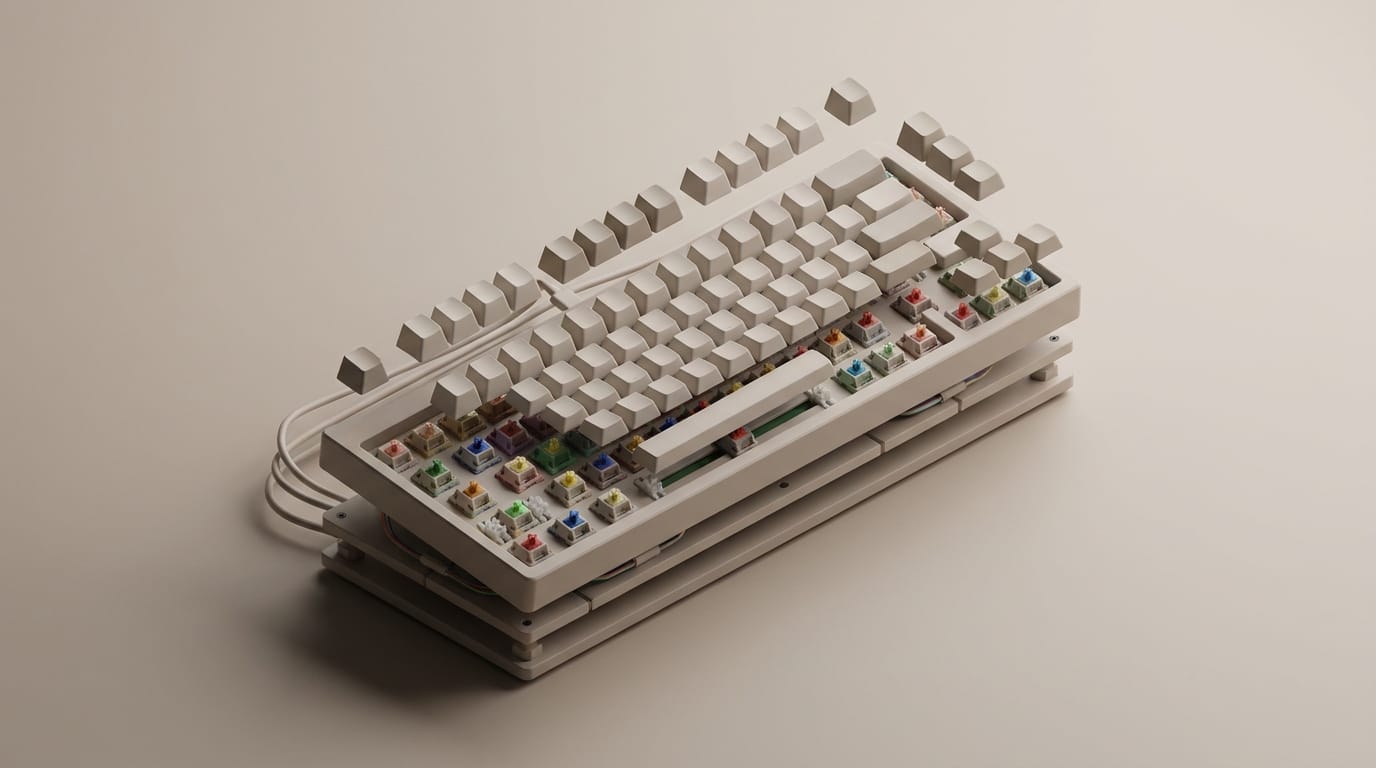
Most people assume a keyboard is just a simple tool for input. Once you move past the mushy resistance of a standard membrane board, you realize that the sound and feel of every keystroke can be engineered for perfection. This mechanical keyboard guide serves as your roadmap for navigating the physical systems and acoustic properties that define the modern typing experience.
The keyboard market currently transforms from a niche gaming interest into a mainstream productivity standard. Market projections show the industry reaching over two billion dollars in the near future, driven by high annual growth. This surge stems from a collective desire for hardware that offers tactile longevity and a personalized sound. Whether you are a developer looking for a responsive terminal or a hobbyist chasing a specific creamy sound profile, understanding the underlying mechanics is essential. A keyboard is more than the sum of its keys; it is a complex assembly of plates, switches, and dampening materials that interact to create a unique feedback loop.
The Mechanical Difference vs Membrane Keyboards
To understand the appeal of mechanical hardware, you must first look at what it replaces. Most standard keyboards use a membrane system which relies on three layers of plastic film and a conductive trace. When you press a key, you squash a rubber dome until it makes contact with the bottom layer to complete a circuit. This method feels soft and vague because the rubber provides little feedback.
How Individual Switch Actuation Works
Unlike the singular sheet of rubber found in membrane designs, a mechanical keyboard uses individual, self-contained switches for every key. Each switch contains a plastic housing, a spring, and copper contact leaves. When you press the stem, it moves a physical barrier out of the way, allowing the copper leaves to touch and send a signal to the computer. This discrete architecture allows for much higher precision because the switch activates partway through the press. You do not have to bottom out or push the key all the way down to register a stroke. This physical interaction shows how structure and function design governs hardware systems, as the individual nature of the switches ensures that one failed key does not break the entire board.
The Reliability of Physical Contact Points
Durability is the hallmark of the mechanical switch. While a standard membrane keyboard usually lasts for 5 to 10 million keystrokes, modern mechanical switches are frequently rated for 50 to 100 million presses. The springs maintain a consistent force over years of use, preventing the keys from feeling slow as the material ages. Furthermore, mechanical boards often feature N-Key Rollover, which allows the hardware to recognize every single key pressed at the same time. This is a technical advantage for high-speed typing and gaming where missing a single input could disrupt your workflow.
The Core of the Mechanical Keyboard Guide: Choosing Your Switch
The switch is the soul of the keyboard, and it determines how the device feels, sounds, and responds. While there are thousands of variations today, most fall into three distinct families based on their internal geometry and the feedback they provide to your fingertips.
Linear Switches for Speed and Smoothness
Linear switches offer a smooth, uninterrupted travel from the top of the press to the bottom. There is no tactile bump or audible click before the key registers. This smooth action makes them popular with gamers because it allows for rapid, repeated keypresses with little resistance. Currently, non-tactile linear switches hold a dominant revenue share of the market. Their popularity comes from their versatility; they are often the easiest to lubricate for a frictionless feel, and their consistent force reduces hand fatigue during long typing sessions.
Tactile Switches for Physical Confirmation
Tactile switches provide a physical bump at the point of activation. This feedback tells your brain exactly when the key has been registered, allowing you to move to the next key without needing to press further. It is a satisfying middle ground that balances the speed of a linear switch with the precision of a physical indicator. Tactile switches are excellent for office environments where you want feedback without the loud noise of a clicky switch. They encourage a lighter typing style which can improve long-term wrist health and efficiency.
Clicky Switches for Auditory Feedback
Clicky switches add a secondary mechanism, often a click jacket or a click bar, that produces a sharp, audible snap alongside the tactile bump. These are the loudest switches and recall the classic typewriter feel. While they provide the most feedback of any switch type, their noise level makes them less ideal for shared workspaces or late-night sessions at home.
How Materials Define Your Keyboard Acoustics
While technical specifications matter, the modern community focuses heavily on acoustics. The way a keyboard sounds is often more important to enthusiasts than the raw speed of the switches. This sound signature depends on how vibrations travel through different materials within the case.
Aluminum vs Polycarbonate Plates
The plate sits between the switches and the circuit board, and its stiffness determines both the feel and the pitch of every stroke. Aluminum plates are rigid and durable, producing a higher-pitched sound profile. They offer a firm typing experience that feels solid and responsive. Polycarbonate plates are flexible and softer, so they absorb more vibration and lead to a deeper sound. If you want a deep, resonant sound like a heavy stone hitting wood, polycarbonate or plastic plates are the better choice. This material flexibility also provides a bouncier typing feel that many find more comfortable for work.
ABS vs PBT Keycap Density
Keycaps are not just decorative; they act as the resonance chamber for every stroke. Most keyboards come with ABS plastic keycaps which are thin and tend to develop a shine over time as the plastic wears down. From an acoustic perspective, ABS often produces a thinner sound. PBT is a denser, more textured plastic that resists shine and provides a much deeper acoustic profile. Because PBT keycaps are heavier and more rigid, they dampen the high-frequency ping of the switch spring to create a cleaner sound.
The Science Behind the Thock Sound Signature
Achieving a specific sound requires managing the air pockets and vibrations within the keyboard case. A hollow plastic case will act like a drum by echoing and amplifying unwanted noise. By choosing denser materials and isolating the plate from the case using a gasket mount system, you can control how energy moves. This process is similar to how hardware and physics define image quality, where the physical constraints of the components dictate the final output regardless of the software used.
Modding Your Board for Maximum Performance
One of the greatest joys of owning a mechanical keyboard is modding, which involves taking apart your board to improve its performance. Many modern boards are hot-swappable, meaning you can pull the switches out and replace them without using a soldering iron.
Why Switch Lubing Changes Everything
Even expensive switches can have a slight scratchiness caused by plastic-on-plastic friction. Enthusiasts apply synthetic lubricants to the internal rails and stems of each switch to eliminate this friction and any spring noise. This results in a smooth keystroke that feels significantly more premium than stock hardware. While lubricating 100 switches can take several hours, it is the most effective way to elevate a budget keyboard to high-grade performance. It changes the experience from a mechanical task into a sensory pleasure.
Case Foam and Gasket Mounts for Vibration Control
To eliminate the hollow sound found in many mass-produced keyboards, hobbyists use sound-dampening foam. Placing a layer of silicone foam between the circuit board and the bottom of the case absorbs high-frequency vibrations. Additionally, a gasket mount system uses small pieces of rubber to suspend the plate inside the case. This prevents the plate from touching the case directly, which isolates the sound and creates a softer, more consistent typing feel across the entire board.
Stabilizer Tuning for Rattle-Free Typing
The larger keys on your keyboard, like the spacebar and Enter key, require stabilizers to prevent them from wobbling. In many out-of-the-box keyboards, these stabilizers rattle loudly and create a distracting tick sound. Tuning stabilizers involves applying heavy grease to the metal wires and ensuring the plastic feet sit flat against the circuit board. This results in large keys that sound just as solid and deep as your standard letter keys.
Custom Layouts and Ergonomics
Your choice of layout should depend on your desk space and your specific workflow. While the full-size keyboard with a dedicated number pad is the traditional standard, many users move toward compact designs to improve comfort. Following a mechanical keyboard guide can help you decide which size fits your lifestyle.
Full Size vs Tenkeyless vs 60 Percent
A full-size keyboard is excellent for data entry, but it forces your mouse hand further away from your body, which can lead to shoulder strain. A Tenkeyless board removes the number pad so your mouse and keyboard stay more centered. For the minimalist, a 60 percent keyboard removes the function row and arrow keys entirely, relying on layers to access those functions. This reduction in size is not just about looks. By keeping your hands closer together, you reduce the repetitive reaching motions that cause pain. Much like how pelvic tilt exercises correct posture by realigning the body, a compact keyboard layout realigns your workstation for better health.
The Benefits of Ortholinear and Split Keyboards
For those looking to improve ergonomics further, ortholinear and split keyboards offer a departure from tradition. Standard keyboards have staggered rows which is a vestige of 19th-century typewriter design. Ortholinear keyboards align keys in a perfect grid that follows the vertical movement of your fingers. Split keyboards go a step further by separating the left and right halves of the board. This allows you to place each half at shoulder width to prevent your chest from collapsing forward and reducing tension in your neck. While the learning curve for these layouts is steep, the benefits for those with chronic wrist or shoulder issues are substantial.
Integrating these hardware choices into a larger performance strategy is common among professionals. A properly chosen keyboard layout stabilizes your physical output for a smoother creative or professional session. Ultimately, the mechanical keyboard hobby is a pursuit of personalization. By understanding how individual components, from the lubrication on a switch stem to the density of a polycarbonate plate, affect the final experience, you can build a tool calibrated to your specific needs. It is a rare opportunity to take a piece of technology we use for eight hours a day and turn it into something that provides genuine satisfaction with every click.
The real insight of the modern movement is that typing does not have to be a chore; it can be a sensory ritual. As manufacturing costs for high-end materials like aluminum and PBT plastic continue to fall, these premium experiences become accessible to everyone. The journey from a mushy membrane board to a custom-tuned mechanical masterpiece is one of the most rewarding upgrades any computer user can make. You can prioritize the sharp feedback of a tactile switch or the deep, muted resonance of a gasket-mounted linear build to suit your own style.