
The Evolution of Flexible Display Technology
As computing moves away from static screen dimensions, rollable displays represent a shift in how hardware manages tension and durability. These rollable screen laptops provide a solution to the limitations of fixed-size displays without the mechanical vulnerabilities often seen in traditional folding devices.
From Static Panels to Pliable Substrates
Modern flexible computing is rooted in the transition from glass-based Liquid Crystal Displays (LCDs) to Organic Light Emitting Diodes (OLEDs). Unlike LCDs, which require a rigid backlight, OLEDs are self-emissive. This architectural difference allows engineers to replace fragile glass with thin, plastic-based polyimide (PI) films.
These films are manufactured to a thickness of mere micrometers. This provides the foundational pliability required for a screen to bend or roll without fracturing the underlying circuitry. By removing the glass constraint, the display becomes a component that can be manipulated mechanically.
Distinction Between Foldable and Rollable Systems
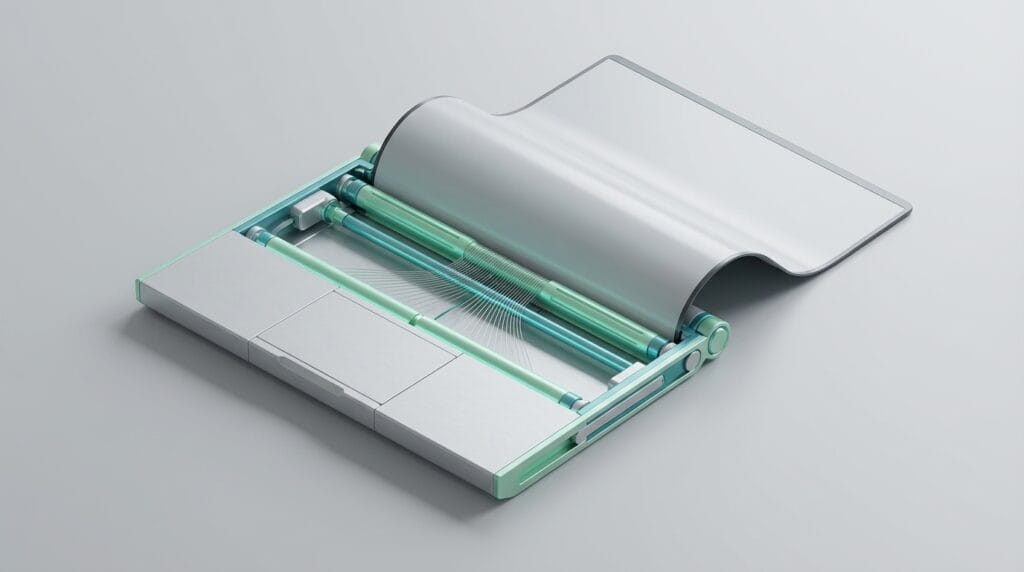
While foldable devices rely on a localized hinge that subjects a specific “spine” to repeated stress, rollable screen laptops distribute physical strain across the entire surface area. The panel wraps around an internal motor-driven cylinder, avoiding the sharp angles that lead to fatigue.
By spreading the movement over a wider area, rollable systems minimize the risk of micro-fractures in the thin-film encapsulation layer. This layer is critical for protecting the organic material from oxygen and moisture, which can degrade the pixels. This distributed stress model suggests a more durable long-term solution for flexible hardware.
Internal Mechanics of Rollable Screen Laptops
The primary engineering challenge is managing the screen’s geometry during deployment and retraction. The system must maintain perfect flatness when extended while remaining compact when stowed. This requires a coordination of motorized force and structural support.
Motorized Roll Cycles and Extension Logic
Modern prototypes, such as those demonstrated by Lenovo, utilize high-torque micro-motors and specialized caterpillar-track backing. This backing provides the structural rigidity necessary for the screen to function as a stable display once it leaves the chassis. The mechanism ensures the screen does not wobble or flex during use.
The extension logic is triggered by physical switches or software commands. The motor applies a constant speed to prevent stuttering during deployment. This consistent movement is essential to prevent uneven wear on the display’s backplate and ensure the internal layers move in unison.
Tension Management and High-Performance Fiber Cables
A critical component of this system is the tension-management mechanism. To ensure the screen remains flat and does not sag when extended, engineers use high-performance fiber cables made of materials like Aramid. These cables act as a winch system, pulling the display taut against the internal support structure.
This hidden layer of tension management is the core breakthrough in rollable screen laptops. It allows the device to achieve a level of planarity that rivals traditional rigid panels. It effectively hides the fact that the screen was recently a tight coil, providing a seamless visual surface for the user.
Solving the Crease Problem in Flexible Screens
The “crease” has been the primary aesthetic and functional hurdle for foldable technology. When a material is folded, it experiences compression on the inner radius and tension on the outer radius. Over time, this leads to permanent deformation of the plastic substrate.
Mechanical Advantages Over Traditional Foldables
Rollable mechanisms maintain a consistent, larger bend radius. Instead of folding at a 180-degree angle, the screen wraps around a barrel typically 5mm to 10mm in diameter. This significantly reduces the strain on the thin-film transistors (TFTs) that drive the display.
Because the stress is distributed rather than localized, the “memory effect” of the plastic substrate is largely neutralized. This prevents the visible dip or ridge common in foldable phones and tablets. The result is a display that looks identical to a standard screen once fully deployed.
Cycle Ratings and Long-Term Durability
As of early 2026, industry standards for rollable displays aim for a lifespan of 25,000 to 50,000 cycles. For a professional user, this translates to roughly five to ten years of daily use. To reach these numbers, material scientists have improved the adhesion between OLED layers and protective top-coats.
These improvements ensure that the layers do not delaminate—or peel apart—under the constant shear forces of rolling. While the mechanics are complex, the reduced intensity of the bend radius suggests these screens may eventually outlast their folding counterparts in professional environments.
Impact on Portable Productivity and User Experience
The value of an expandable display is the ability to change hardware to fit the task. Users no longer need to choose between a compact device for travel and a large screen for complex work. The hardware adapts to the digital environment.
Dynamic Aspect Ratios for Multitasking
A rollable laptop can exist in a compact mode, typically a 12-inch or 13-inch 4:3 display for standard office work. With a command, it can expand to a 16:9 or 21:9 ultrawide configuration. This is useful for professionals who require the screen real estate of a 17-inch workstation in a smaller footprint.
For data analysts and developers, expanding the screen vertically allows more lines of code or spreadsheet rows to be visible. This flexibility changes how software interfaces are designed, as they must now account for a workspace that grows or shrinks based on user needs.
Weight-to-Screen-Area Ratios
Traditional 17-inch laptops are heavy because they require large chassis to support massive glass panels. Rollable screen laptops disrupt this weight-to-utility ratio. Because the screen is a lightweight plastic film and the support structure is internal, the overall weight can be kept closer to that of a 13-inch device.
This allows for a mobile ultrawide setup that fits into a standard messenger bag. By reducing the physical mass of the display, manufacturers can focus on performance and battery life without making the device cumbersome for commuters or remote workers.
Engineering Constraints and Design Trade-offs
The shift to rollable hardware introduces new complexities. These trade-offs are the current focus of R&D at companies like Samsung and LG. A rollable device is inherently more mechanically active than a standard laptop.
Dust Ingress and Environmental Protection
A traditional laptop is a sealed environment when closed. A rollable laptop has an opening where the screen exits the chassis, creating a point of entry for dust and moisture. Engineers use “wiper” seals—tiny brushes or silicone gaskets—to clean the display as it retracts.
However, if a hard grain of sand bypasses these seals, it can be rolled into the mechanism, potentially scratching the plastic display from the inside. This makes these devices more delicate in harsh environments compared to rigid laptops. Users must balance the benefit of screen size with the need for careful handling.
Battery Distribution and Thermal Management
The barrel mechanism that holds the rolled screen occupies significant internal volume. This displaces traditional components like the battery and cooling fans. To compensate, engineers often use split-battery designs or higher-density cells which can increase costs.
Thermal management also becomes more complex. The system must dissipate heat effectively whether the screen is retracted or fully extended. Because the screen can cover different parts of the chassis depending on its state, air vent placement and heat pipe routing must be precision-engineered.
Evaluating the Future of Expandable Hardware
The transition from prototype to daily-driver tool depends on software as much as mechanical engineering. The operating system must respond to changing physical dimensions in real-time, requiring deep integration with window managers.
Software Optimization for Changing Form Factors
As a screen expands, the user interface must dynamically reflow content, move taskbars, and rescale applications without crashing drivers. Intel and other chipmakers are developing “contextual sensing” that instructs the processor to adjust the GPU output frame-by-frame as the motor moves.
Without this software layer, the mechanical expansion would be jarring. The goal is a seamless transition where the workspace grows naturally as the hardware deploys. This requires a unified standard across operating systems to ensure third-party apps behave predictably on variable displays.
From Novelty to Standardized Tool
We are currently in the early adopter phase of this technology. The first retail units are positioned as premium workstations for executives and creative professionals. However, as the yield rates for flexible OLEDs improve, the cost of motorized components is expected to decrease.
The ultimate success of rollable screen laptops will be determined by their ability to prove they are a robust solution for mobile productivity. By focusing on tension management and motorized precision, the industry is moving toward a future where screen size is a software setting rather than a hardware limitation.
“The goal is a device that is as small as possible when you are moving, and as large as necessary when you are working.”
While challenges of environmental protection and cost remain, the mechanical foundation is solid. The era of the static, rigid laptop screen is beginning to give way to systems that adapt to the user’s immediate needs.